Skip to content
XuladTrading robot Download
Free · for MetaTrader 5 on Windows

Your trading robot, set up and watched for you.

Xulad installs its own MetaTrader 5, runs three rule-based strategies on your JustMarkets account, and keeps an eye on them day and night. You choose the risk. It does the rest.

Version 1.0.8 · Windows 10 or 11 · needs a sign-in from us

  • 5 minFrom installer to a running robot. The setup walks you through every step.
  • 3Strategies: EURUSD in New York, gold in Tokyo, and gold spikes all day.
  • 24/5The watchdog keeps MT5 running while the markets are open.
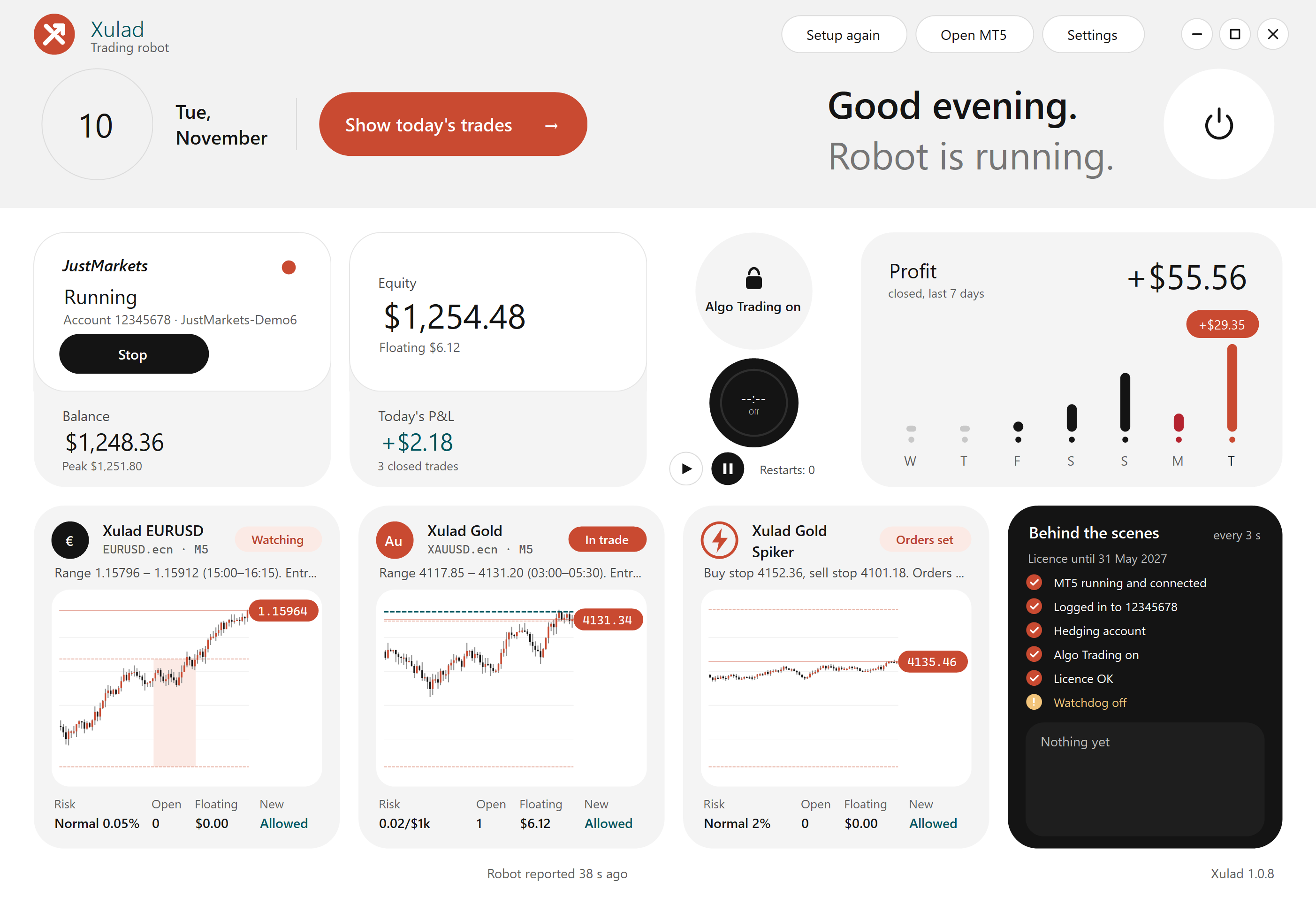
The Xulad control panel: account, equity, watchdog, last 7 days' profit, a live chart for each strategy, and the health checks.
How it works

One app does the setup, the trading and the watching.

No charts to configure and no settings files. Xulad's setup takes about five minutes, then it runs quietly in the tray.

Its own MT5

Makes a separate copy of JustMarkets' MetaTrader 5 with the robot and its charts ready. Your other MT5 stays untouched.

A watchdog

Starts MT5 again if it closes or freezes, and tells you when it did. Licence checks and updates run in the background.

One clear window

Balance, equity, today's profit, the last 7 days, a live chart per strategy and a health check, refreshed every second.

Safe updates

New versions arrive by themselves. Each one is signed, and Xulad only installs updates with our signature.

What Xulad never does

  • Asks for or stores your broker's trading password
  • Moves money in or out of your account
  • Gives financial advice
  • Stops you: close any trade or stop the robot at any time
The strategies

Three strategies, fixed rules.

Each strategy trades by the same rules every day. Switch each one on or off, and pick a risk level for Xulad EURUSD and Xulad Gold Spiker. Xulad Gold's size grows with your account.

€

Xulad EURUSD

EURUSD · M5
No stop-loss
  • SessionNew York, from 08:00 New York time
  • RangeThe first 75 minutes
  • EntryFor the next 115 minutes, a touch of a range edge opens a trade against it
  • ExitTarget 1.5 × ATR. If price runs against it, an averaging grid adds trades and closes them all at one target
Low0.03%worst drop 24%
Normal0.05%worst drop 35%
High0.075%worst drop 58%
Au

Xulad Gold

XAUUSD · M5
Stop-loss on every trade
  • SessionTokyo, from 09:00 Tokyo time
  • RangeThe first 150 minutes
  • EntryA 5-minute candle closing outside the range within the next 5 hours, with the trend (250 EMA)
  • ExitStop at the other side of the range, target 8× that distance, trailing near the target, out after 10 hours
Size0.02 lots per $1,000of your highest balance: 0.04 at $2,000 · worst drop 58%

Xulad Gold Spiker

XAUUSD · M30 levels
Stop-loss on every trade
  • HoursOrders from 06:00 to 22:00 server time (Fridays to 15:00)
  • LevelsThe last unbroken swing high and low on the 30-minute chart
  • EntryA buy stop and a sell stop rest at those levels: a fast move through one fills it
  • Exit$2.40 stop, $10 target, and a stop that trails $0.20 behind once $0.30 in profit. Most trades last minutes
Low1%worst drop 9%
Normal2%worst drop 19%
High3%worst drop 28%

Risk % = how much of the account one trade (or one EURUSD grid) aims to risk. EURUSD's worst drops are from backtests 2019–2026 on a larger account; Xulad Gold and Xulad Gold Spiker from the $1,000 backtests below.

Backtest results

What the robot did from $500 and $1,000.

The exact robot Xulad installs, run in MetaTrader 5's Strategy Tester on JustMarkets prices, 1 January 2024 to 6 November 2026.

These are backtests on past prices, not real accounts and not a promise. Real trading has other fills, costs and breaks, and can lose more. Start on a demo account.

Xulad Gold · from $1,000

+$0
Balance after each closed trade, weekly. Open trades are not in the line; they are in the worst drop.
End balance–
Return–
Worst drop, open trades included–
Trades–
Winning trades–
Profit factor–
Worst month–
StrategyRiskStartEndReturnWorst dropTradesWon

Each strategy on its own account, 1:500 leverage, JustMarkets Raw (.ecn) prices and commission. Gold uses real ticks all the way; EURUSD real ticks start in July 2026, before that its ticks are built from 1-minute prices. Xulad Gold Spiker fills its stop orders at the first price past the level, as the tester does; real fills can differ. Running several strategies on one account adds their drops together. Click a row to see its chart.

Get started

Four steps, about twenty minutes.

Start on a demo account. Move to a real account only when you know how the robot behaves.

Open a JustMarkets account

Choose MetaTrader 5 and a hedging account, demo first. If the form asks for a partner code, use ours.

Open an account ↗ toit9l0eyp

Ask us for your sign-in

Xulad is private. Write to us and you get a username, password and licence key. Never send us your broker password.

Install JustMarkets MT5 and Xulad

Install JustMarkets' MetaTrader 5, then run Xulad-Setup.exe. No administrator rights needed.

Sign in and follow the setup

Six short steps: terms, broker, licence, strategies and risk, MT5, checks. Then log in to your account in MT5 and you're done.

You'll need

  • A Windows 10 or 11 PC that stays on and online, or a Windows VPS
  • A JustMarkets MT5 hedging account (demo to start)
  • At least about $500 on a real account
  • Your Xulad username, password and licence key
A look inside

Every screen, in plain words.

Light, calm and readable. Every setting explains itself, and anything risky says so.

Questions

Good to know.

Does it cost anything?

No. Xulad is free and private: we share it with people we know. If you open your JustMarkets account through our link, JustMarkets may pay us a partner commission. It costs you nothing and doesn't change your trading conditions.

Can I use another broker?

No. The robot only trades JustMarkets MT5 accounts with hedging. It refuses to start anywhere else and tells you why.

Does my PC need to stay on?

Yes, while you want it to trade. If the PC sleeps or goes offline, the robot can't open or manage trades. Many people use a small always-on PC or a Windows VPS. Turn on "Start with Windows" in Settings so Xulad comes back after a restart.

What if the internet drops?

The watchdog restarts MT5 when it can. The robot keeps trading for up to 72 hours without a licence check, and open trades are always managed to the end.

Why are there days with no trades?

That's normal. Each strategy only enters in its own session window and only when its rules line up. Xulad Gold Spiker only trades when gold moves fast through a swing level.

Can I change the settings?

Yes. Settings → Customise lets you change risk, trading days, times and limits. Each setting shows its tested value, and anything away from it shows a caution. Changed settings are untested: try them on demo first.

How much should I start with?

At least about $500 on a real account. Below that, the smallest gold trade already risks more than the level you chose. From $1,000 the backtests above were much calmer than from $500.

Risk, in plain words.

  • Trading forex and gold with leverage can lose money quickly, including everything in the account.
  • Our numbers come from backtests and demo trading. Real results can be worse.
  • Xulad EURUSD has no stop-loss and can hold a large loss for weeks.
  • PCs, internet, MT5 and broker servers can fail; trades can be missed or left unmanaged.
  • Start on demo, use money you can afford to lose, and pick a risk level you could live with at its worst drop.